
Compression tuning in the PI System is one of those things that feels invisible until it causes real problems. As someone who’s worked closely with PI users for years, I’ve seen both ends of the spectrum: tags so over-compressed they miss critical changes, and others that flood the archive with unnecessary data points.
When compression isn’t tuned correctly, data quality suffers and so does user trust.
The Impact of Compression on Data Quality
Compression and exception filtering are essential for reducing storage load on the PI Data Archive. But when these filters are too aggressive, they stop recording values that operators and engineers rely on. The result?
- Flat-line trends that hide variability
- KPIs that don’t match what’s happening in the field
- Alerts that never fire or fire too late
- Hours of troubleshooting when users say “the data looks wrong”
On the other hand, skipping compression altogether creates its own challenges:
- Massive growth in recorded values per tag
- Slow AF Analyses and PI Vision display load times
- Overloaded networks and storage
- Longer backfilling and recalculation times
Getting it right requires balance and visibility. That’s where Tycho Data Osprey comes in.
How Osprey Helps Identify Compression Issues
Osprey continuously scans your PI Tags and AF Attributes, and flags tags that may be improperly tuned. Instead of waiting for end users to report odd behavior, you can proactively spot problems like:
- Tags that haven’t recorded changes in weeks despite active assets
- Tags logging a new value every second with no significant change
- Flat-line trends on critical process variables
- Overloaded analyses that reference extremely granular tag data
- KPI or dashboard inconsistencies tied back to missing data due to compression
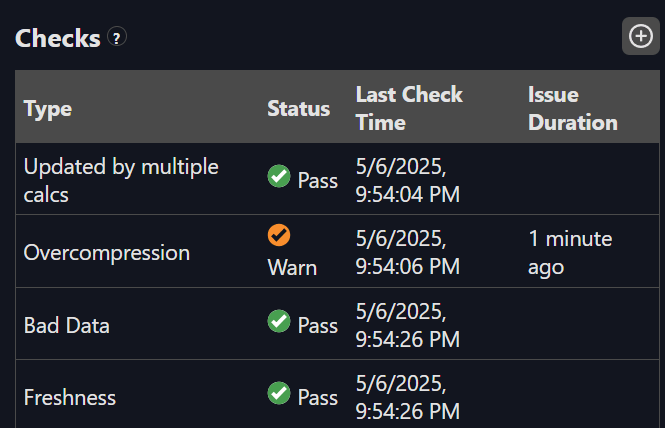
Osprey also correlates these tags to where they’re being used whether in a Vision display, an AF Analysis, or a downstream calculation so you know what’s impacted.
Compression Isn’t Set-and-Forget
Compression settings are often configured once during commissioning and never looked at again. But as systems evolve – new equipment, changing process dynamics, new use cases – what made sense 5 years ago may be costing you insight today.
With Osprey, you finally get a lens into how compression is affecting your data quality and where it might be silently hurting your operations.
Want to See It in Action?
We’ve put together a demo that shows exactly how Osprey flags over-compressed tags and highlights downstream issues.
 Tycho Data